Guild Land: Difference between revisions
No edit summary |
No edit summary |
||
| Line 2: | Line 2: | ||
*[[Guilds#Guild Level|Guild Level]]: 10 | *[[Guilds#Guild Level|Guild Level]]: 10 | ||
*40 | *40.000.000 to 70.000.000 [[File:Money.png|link=|Yang]] [[Yang]] | ||
<!-- | <!-- | ||
Bauen könnt ihr z. B. auf den Ländereien um die Stadt in [[Map1]] herum. Auf der Karte sind diese mit Fähnchen dargestellt, welche wenn ihr mit dem Mauszeiger drüber fahrt, den Namen der Gilde darstellen, die das Land gekauft hat. Wenn das Land frei bzw. leer ist, könnt ihr dort bauen. Habt ihr das Land für 40-70 Millionen gekauft, könnt ihr allerdings nicht gleich losbauen wie es euch gefällt, denn ihr müsst für jedes Gebäude bestimmte Voraussetzungen erfüllen und natürlich bezahlen.--> | Bauen könnt ihr z. B. auf den Ländereien um die Stadt in [[Map1]] herum. Auf der Karte sind diese mit Fähnchen dargestellt, welche wenn ihr mit dem Mauszeiger drüber fahrt, den Namen der Gilde darstellen, die das Land gekauft hat. Wenn das Land frei bzw. leer ist, könnt ihr dort bauen. Habt ihr das Land für 40-70 Millionen gekauft, könnt ihr allerdings nicht gleich losbauen wie es euch gefällt, denn ihr müsst für jedes Gebäude bestimmte Voraussetzungen erfüllen und natürlich bezahlen.--> | ||
| Line 14: | Line 14: | ||
It makes little sense to visit the [[Land Agent]] unless you're the leader of a guild. After purchasing the land, the leader can click a small button (Build Mode) in the bottom right corner of the screen to see an image. This image represents the actual size of the guild plot and shows how much space is available for construction. | It makes little sense to visit the [[Land Agent]] unless you're the leader of a guild. After purchasing the land, the leader can click a small button (Build Mode) in the bottom right corner of the screen to see an image. This image represents the actual size of the guild plot and shows how much space is available for construction. | ||
==== Loss of the Land | |||
=== Guild Yang === | |||
Through the guild plot and the alchemists and blacksmiths located on it, the leader of a guild can also earn Yang. When people who are not members of the guild upgrade items on the guild’s plot, the guild receives the required Yang into its guild account (visible in the guild window). However, it's important to note that only 10% of the costs are transferred to the guild account. | |||
=== Loss of the Land === | |||
The plot can be lost if none of the guild members have logged in for 90 days. After the dissolution of a guild that owned a plot, the land becomes available for purchase again. However, frequent issues can occur during the purchase process, including occasional price variations. | |||
=== The Construction Menu === | === The Construction Menu === | ||
In the build menu, you can see which buildings and objects you can construct, their costs, and use the slider to rotate the object. Using the "Switch" button under "Location," you can determine the position of the building or object on the plot, as it can be freely placed and rotated on the land when setting it up. Once the building is placed, its position and orientation cannot be changed. Therefore, you should make sure the buildings are correctly positioned the first time they are set. | |||
Note: You (and no other character) should be standing in the area where the building/NPC will be placed, otherwise the build menu will close without any notification. | |||
[[File:Guild House Building.png]] | [[File:Guild House Building.png]] | ||
Revision as of 17:29, 21 October 2024
Requirements
- Guild Level: 10
- 40.000.000 to 70.000.000
 Yang
Yang
▲ Go to the top ▲
All about Guild Land

Almost every guild in every kingdom strives to own a piece of guild land. However, guild land is not cheap and is also limited in availability. The cost for guild land ranges between 40.000.000 and 70.000.000 Yang, which can be difficult to gather.
Plots are available on each Map1 and in the guild land area or Yohara. Once you've cleared the first hurdle and gathered enough Yang to purchase land, you can head to the Land Agent.
It makes little sense to visit the Land Agent unless you're the leader of a guild. After purchasing the land, the leader can click a small button (Build Mode) in the bottom right corner of the screen to see an image. This image represents the actual size of the guild plot and shows how much space is available for construction.
Guild Yang
Through the guild plot and the alchemists and blacksmiths located on it, the leader of a guild can also earn Yang. When people who are not members of the guild upgrade items on the guild’s plot, the guild receives the required Yang into its guild account (visible in the guild window). However, it's important to note that only 10% of the costs are transferred to the guild account.
Loss of the Land
The plot can be lost if none of the guild members have logged in for 90 days. After the dissolution of a guild that owned a plot, the land becomes available for purchase again. However, frequent issues can occur during the purchase process, including occasional price variations.
The Construction Menu
In the build menu, you can see which buildings and objects you can construct, their costs, and use the slider to rotate the object. Using the "Switch" button under "Location," you can determine the position of the building or object on the plot, as it can be freely placed and rotated on the land when setting it up. Once the building is placed, its position and orientation cannot be changed. Therefore, you should make sure the buildings are correctly positioned the first time they are set.
Note: You (and no other character) should be standing in the area where the building/NPC will be placed, otherwise the build menu will close without any notification.

Building
Guild House
Must be built before any other buildings.
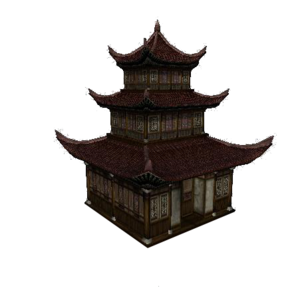

| Material | Number |
|---|---|
| Yang | 20.000.000 |
| Foundation Stone | 20x |
| Trunk | 30x |
| Plywood | 25x |
Blacksmith/Alchemist
Weaponsmith
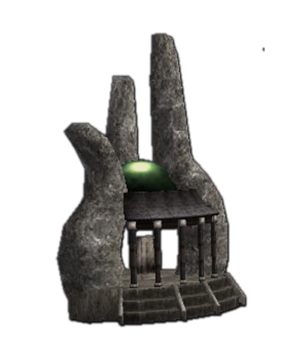

| Material | Number |
|---|---|
| Yang | 20.000.000 |
| Foundation Stone | 20x |
| Trunk | 30x |
| Plywood | 20x |
Armoursmith
| Material | Number |
|---|---|
| Yang | 20.000.000 |
| Foundation Stone | 20x |
| Trunk | 30x |
| Plywood | 20x |
Acc. Designer
| Material | Number |
|---|---|
| Yang | 20.000.000 |
| Foundation Stone | 20x |
| Trunk | 30x |
| Plywood | 20x |
Alchemist
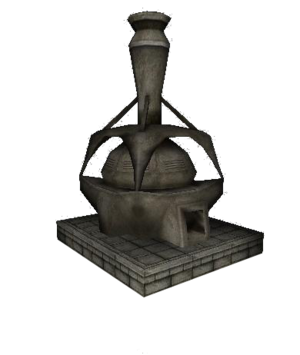
.png)
| Material | Number |
|---|---|
| Yang | 20.000.000 |
| Foundation Stone | 15x |
| Trunk | 20x |
| Plywood | 25x |
▲ Go to the top ▲
Altar of Power

| Material | Number |
|---|---|
| Yang | 25.000.000 |
| Foundation Stone | 25x |
| Trunk | 25x |
| Plywood | 25x |
▲ Go to the top ▲
Altar of Power Extension 1

| Material | Number |
|---|---|
| Yang | 25.000.000 |
| Foundation Stone | 10x |
| Trunk | 10x |
| Plywood | 15x |
▲ Go to the top ▲
Altar of Power Extension 2

| Material | Number |
|---|---|
| Yang | 30.000.000 |
| Foundation Stone | 15x |
| Trunk | 20x |
| Plywood | 20x |
▲ Go to the top ▲
Guild Logo
The sign/logo of the guild.

| Material | Number |
|---|---|
| Yang | 3.000.000 |
| Trunk | 5x |
| Plywood | 5x |
▲ Go to the top ▲
Stones

| Material | Number |
|---|---|
| Yang | 300.000 |
| Foundation Stone | 5-9 |
▲ Go to the top ▲
Trees

| Material | Number |
|---|---|
| Yang | 2.000.000 |
| Trunk | 5-9 |
▲ Go to the top ▲