Features: Difference between revisions
Jump to navigation
Jump to search
No edit summary |
|||
| Line 39: | Line 39: | ||
===Pet Info=== | ===Pet Info=== | ||
To access pet user interface you can press "P" on your keyboard or by pressing "F5" to open the shortcut hotbar and clicking on the [[File:Pet UI Button.png|link=]] 'Pet Info' Button.<br><br> | To access pet user interface you can press "P" on your keyboard or by pressing "F5" to open the shortcut hotbar and clicking on the [[File:Pet UI Button.png|link=]] 'Pet Info' Button. | ||
Here you can find additional Information about our [[Pet_System|Pet System]]. | |||
<br><br> | |||
[[File:Pet_UI.png|left|link=]] | [[File:Pet_UI.png|left|link=]] | ||
'''Icon''': Top left, shows the icon of the seal. | '''Icon''': Top left, shows the icon of the seal. | ||
| Line 60: | Line 62: | ||
'''Tabs''': 1st Tab is the normal pet interface, 2nd Tab is the Enchant Pet UI, 3rd Tab is the Pet Revive Interface | '''Tabs''': 1st Tab is the normal pet interface, 2nd Tab is the Enchant Pet UI, 3rd Tab is the Pet Revive Interface | ||
<br><br><br><br> | <br><br><br><br> | ||
===Switchbot=== | |||
Revision as of 17:01, 21 September 2024
General Informations
- Azyrah offers you a wide range of features to make your gaming experience as enjoyable as possible.
- All conveniences can be used by every player without restrictions, without the need to access the Itemshop.
Features

There are 2 ways to access our toolbar.
- You press the "F5" key on your keyboard.
- You press the button between "4" and "F1" on your skill bar.
Another menu will open on top over your skillbar.
Toolbar

- Via left-click you can open and close every feature option.
- In this Toolbar you can find the following Features: (sorted from left to right)
- Patchnotes
- Pet Information
- Switchbot
- Looking Glass
- Drop Search of Items
- Biologist Research
- Dungeon Information
Patchnotes
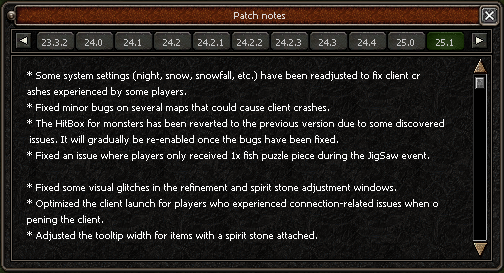
Here you can find all changes around Azyrah, you can see changes, bugfixes, optimizations and much more.
- They are sorted from low numbers up to high numbers.
- The highest number is the last patch.
- Its important to check the patchnotes frequently to stay updated and adjust your playstyle.
- If you figured out a bug on Azyrah click here, and as soon as possible it will appear as Bugfix on our Patchnotes. (Discord Account needed)
Pet Info
To access pet user interface you can press "P" on your keyboard or by pressing "F5" to open the shortcut hotbar and clicking on the  'Pet Info' Button.
Here you can find additional Information about our Pet System.
'Pet Info' Button.
Here you can find additional Information about our Pet System.
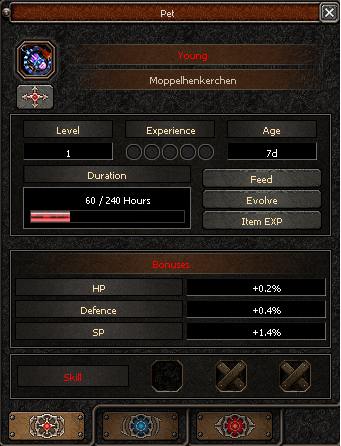
Icon: Top left, shows the icon of the seal.
Identify Pet Button: Top left, allows you to see what pet type the summoned pet is.
1st Line: Shows Pet Stage (Young, Wild, Valiant, Heroic)
2nd Line: Pet Name
Level: Shows pet current level (pets can reach a maximum level of 105).
Experience: Shows the amount of experience the pet has.
Age: Shows how old the pet is.
Duration: The red bar shows how much time the pet has left, it refills when pet is feeded.
Feed: Button that opens the feeding window.
Evolve: Button that opens the evolve window.
Item EXP: Button that opens the window that allows pet to consume gear in order to fill the last 10% EXP of each level.
Bonuses: Bonus given by pet when active.
HP Gives more HP to player
Defense Gives more defense to player
SP Gives more SP to player
Bonuses percentages increase randomly with stage, age and level of pet.
Skill: Pets can have up to 3 skills, Pets can only learn skills once they're evolved to Heroic.
Tabs: 1st Tab is the normal pet interface, 2nd Tab is the Enchant Pet UI, 3rd Tab is the Pet Revive Interface