Features: Difference between revisions
Jump to navigation
Jump to search
No edit summary |
No edit summary |
||
| Line 25: | Line 25: | ||
===Patchnotes=== | ===Patchnotes=== | ||
[[File:Patchnotes.png|link=|right]] | |||
Here you can find all changes around Azyrah, you can see changes, bugfixes, optimizations and much more. | Here you can find all changes around Azyrah, you can see changes, bugfixes, optimizations and much more. | ||
* They are sorted from low numbers up to high numbers. | * They are sorted from low numbers up to high numbers. | ||
* The highest number is the last patch. | * The highest number is the last patch. | ||
Revision as of 13:56, 21 September 2024
General Informations
- Azyrah offers you a wide range of features to make your gaming experience as enjoyable as possible.
- All conveniences can be used by every player without restrictions, without the need to access the Itemshop.
Features

There are 2 ways to access our toolbar.
- You press the "F5" key on your keyboard.
- You press the button between "4" and "F1" on your skill bar.
Another menu will open on top over your skillbar.
Toolbar

- Via left-click you can open and close every feature option.
- In this Toolbar you can find the following Features: (sorted from left to right)
- Patchnotes
- Pet Information
- Switchbot
- Looking Glass
- Drop Search of Items
- Biologist Research
- Dungeon Information
Patchnotes
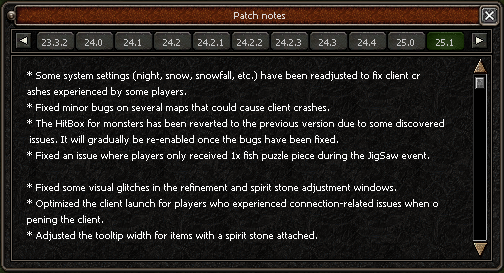
Here you can find all changes around Azyrah, you can see changes, bugfixes, optimizations and much more.
- They are sorted from low numbers up to high numbers.
- The highest number is the last patch.